
Many people are receiving alarming emails claiming their iCloud access has been suspended. These messages often come from suspicious domains like clouddbest.xyz and warn that photos, videos, or stored files will be deleted unless immediate action is taken.
At first glance, the message looks serious and urgent. However, this is not a legitimate notification. It is a phishing scam designed to steal personal information, especially login credentials for accounts linked to Apple services.
This article explains how the scam works, why it is dangerous, and what you should do if you receive such an email.
How This Scam Email Looks Like:-
The fraudulent email usually contains panic-inducing statements such as:
"YourName⚠️ Your iCloud Access Is Suspended,Your photos and videos will be Deleted !! ⚠️ Your payment method has expired: Update your payment information...If you don't have enough Cloud space, you can upgrade your storage plan Your photos and videos will be Deleted !! We failed to renew your Cloud storage !! Without Cloud space, you may lose all your Stored data and files in Cloud service"
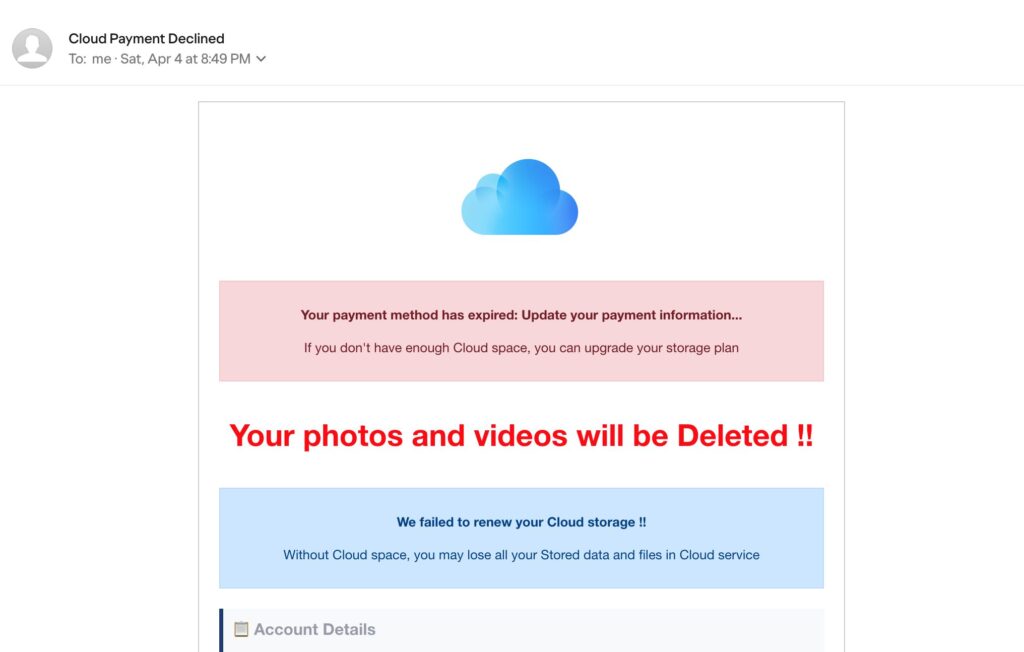
These messages are written in a dramatic tone and often include multiple warnings to create fear. Some emails also contain buttons like “Verify Now” or “Update My Payment.”
Why This Email Is a Scam:-
Suspicious Sender Domain:-
The biggest red flag is the sender domain clouddbest.xyz. Official emails from Apple only come from trusted domains such as @apple.com or @icloud.com. Any email from an unknown domain claiming to represent Apple should be treated with caution.
Urgency And Fear Tactics:-
Scammers intentionally use urgent warnings like “Your photos will be deleted” or “Account suspended.” This is done to pressure users into clicking quickly without verifying the message. Legitimate companies rarely threaten immediate data loss through email.
Fake Login Pages:-
The links inside these emails usually lead to websites that look like official Apple login pages. These pages are fake. Once users enter their Apple ID and password, scammers capture the information. In some cases, victims are also asked to enter credit card details.
Poor Formatting And Errors:-
Many scam emails contain grammar mistakes, repeated sentences, or unusual formatting. Legitimate communications from Apple are usually professionally written and clear.
How The Scam Works:-
- You receive the email claiming your iCloud access is suspended.
- The message includes a link to “update payment” or “verify account.”
- Clicking the link opens a fake login page.
- You enter your Apple ID and password.
- Scammers collect your information.
- They may access your account, lock you out, or attempt financial fraud.
In some cases, scammers may even send follow-up emails asking for additional verification.
Example Scenario:-
Imagine you are using iCloud to store photos. Suddenly, you receive an email saying your storage has expired and your photos will be deleted within 24 hours. You panic and click the link. The page looks real, so you log in. Within minutes, scammers now have your login details and may try to access your account or use your payment information.
This is exactly how phishing attacks succeed, they rely on fear and urgency.
What You Should Do Immediately:-
If you receive such an email:
- Do not click any links in the email, as they may lead to fake websites.
- Do not reply to the email under any circumstances.
- Avoid downloading any attachments from the email.
- Forward the email to [email protected] to report the scam.
- Delete the email from your inbox after reporting it.
You should always verify account issues directly. Instead of clicking links, manually go to the official Apple ID website or check settings on your device.
How To Verify Your Account Safely:-
You can confirm your iCloud storage status by:
- Open the Settings app on your iPhone.
- Tap on your name at the top of the screen to access your Apple ID settings.
- Select iCloud from the list of options.
- Review your storage details to see how much space you are using and if there are any issues with your iCloud account.
Alternatively, you can type the official Apple ID website address manually into your browser instead of using links in emails.
What To Do If You Clicked The Link:-
If you already clicked the link or entered information, act quickly:
- Change your Apple ID password as soon as possible by visiting the official website directly and creating a strong, unique password. Immediately go to appleid.apple.com and change your password.
- Turn on two-factor authentication so a verification code is required along with your password for login.
- Check your account for any unfamiliar devices, changes, or unexpected activity.
- Contact your bank immediately if you entered payment details to prevent unauthorized charges.
- Watch your email for alerts about unknown logins or security changes and act quickly if noticed.
Quick action can reduce potential damage.
Additional Warning Signs To Watch For:-
- Emails asking for urgent payment updates.
- Messages with excessive warning symbols.
- Unknown sender addresses.
- Requests for personal or financial information.
- Links that do not match official domains.
Scammers often change domains frequently, so even similar messages from different domains should be treated as suspicious.
Why These Scams Are Common:-
Phishing scams targeting cloud services are increasing because many users store important data online. Scammers know that threats about losing photos or files can cause immediate panic. They also rely on the popularity of Apple services, making their fake messages appear more believable.
Final Verdict:-
The “Your iCloud Access Is Suspended” email from the domain clouddbest.xyz is a clear phishing scam. It is not legitimate and is not associated with Apple. The message uses fear, urgency, and fake login pages to steal sensitive information. Always verify account alerts independently and avoid clicking suspicious links.
Staying cautious and recognizing these warning signs can help protect your personal data and prevent account compromise.



Leave a Reply